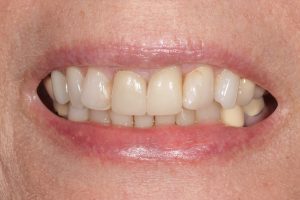
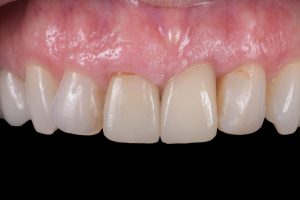
An existing patient, who maintains dental care in the northern United States and in our practice when she visits Florida, experienced a dental emergency. After sustaining a fall, her tooth #9 was fractured at the gumline, necessitating extraction. She was treated by her dentist in the north, who placed an implant in the #9 position and fitted crowns on #8 and #9 (Figs. 1-5).
-

- Figure 1
-
- Figure 2
-
- Figure 3
-
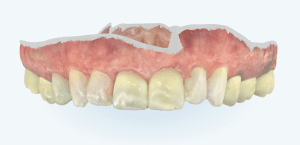
- Figure 4 – Original scan taken prior to emergency surgery
-
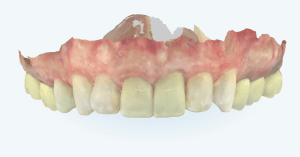
- Figure 5 – Scan taken at consultation after crowns were done
Case Information Diagnostics
Patient’s chief complaint
Upon presenting to us, the patient expressed profound dissatisfaction with the results of her previous restorative treatment. She noted that her new crowns are noticeably narrower than before.
Intraoral assessment
The patient had a sizable bonding on the mesial aspect of the #10 completed prior to the crowning of teeth #8 and #9. This contributed to the reduced space for the crown on the #9, leading to its narrowed appearance. Additionally, there was a noticeable discrepancy in gingival height between #8 and #9. Tooth #7 displayed a slight rotation, and an open margin was observed on #8. The bonding on tooth #10 showed signed of leakage. The original iTero scan taken was the key and crucial evidence we had to determine that the new crowns were in fact, much narrower than what she initially had. She desired to restore the original proportions of her anterior teeth.
Treatment Plan
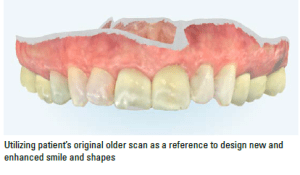
The treatment plan involved placing veneers on teeth #7 and #10 and crowns on teeth #8 and #9. Esthetic crown lengthening would also be performed on teeth #7 and #8 to harmonize the gingival architecture. The patient’s primary objective was to restore the original proportion of her anterior teeth. While we did not have pre-emergency photographs for reference, a prior iTero scan enabled us to accurately recreate the original tooth shape with a few esthetic enhancements. This approach allowed us to achieve optimal esthetic results and fulfill the patient’s wishes. I was able to bring in the patient’ preoperative scan and to use those shapes to recreate what was lost (Figs. 6-9).
-
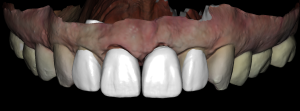
- Figure 6 – Recreation of original tooth shape with esthetic enhancements
-
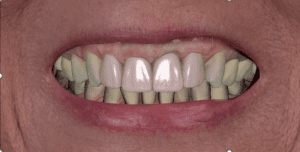
- Figure 7 – exocad digital wax-up created chair side
-
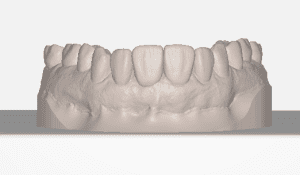
- Figure 8 – 3D model of the wax-up prepared for printing
-
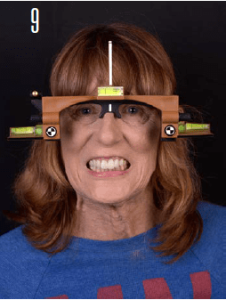
- Figure 9 – Portrait picture with reference glasses to ensure correct alignment
Case Information: The Integrated Chairside Workflow
As part of the consultation appointment, I took the patient’s iTero scan, intraoral and portrait photographs. After transferring these records to my in-house exocad DentalCAD DB design station, I then brought in her old scan to help recreate the proportions that were lost. With all this data, a facially driven digital wax-up was created to help visualize the restorations in situ. The Smile Creator software was used to show the patient the enhanced design in comparison to her existing smile.
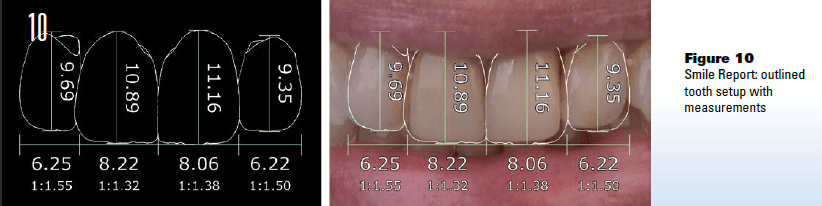
The Smile Report (Fig. 10) generated by exocad was then printed, and the patient had the ability to take her design and plan home with her to review. The Smile Report is a great presentation tool to help patients visualize their potential future smile and increase case acceptance. Once restorations are approved, a design is 3D printed to create the temporary restorations.
 Following the preparation and temporization, I captured another scan to record the final adjustments to the temporary restorations. At this point, the lab stepped in to transform my digital designs into final ceramic restorations.
To facilitate the transition, I provided the laboratory with two sets of records:
- The initial set included the prep scan, shade tab, and pre-temporization photographs.
- A subsequent set was sent a week later, featuring a scan of temporary restorations, my exocad DentalCAD design files, and a PowerPoint template containing case-specific instructions.
Treatment Sequence
Appointment #1: Consultation and design review
We designed a digital wax-up to visualize the treatment, recreating and esthetically enhancing the patient’s original tooth shape. This design was then presented to the patient for approval with exocad’s Smile Creator. Once confirmed, the final design was converted into a 3D-printed model to facilitate the treatment (Figs. 11-14).
-
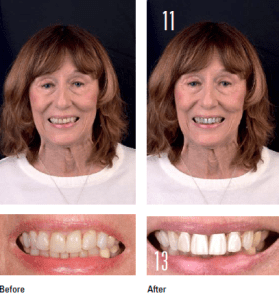
- Figure 11 and 13
-
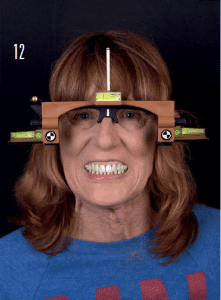
- Figure 12
-

- Figure 14
Appointment #2: Preparation Day
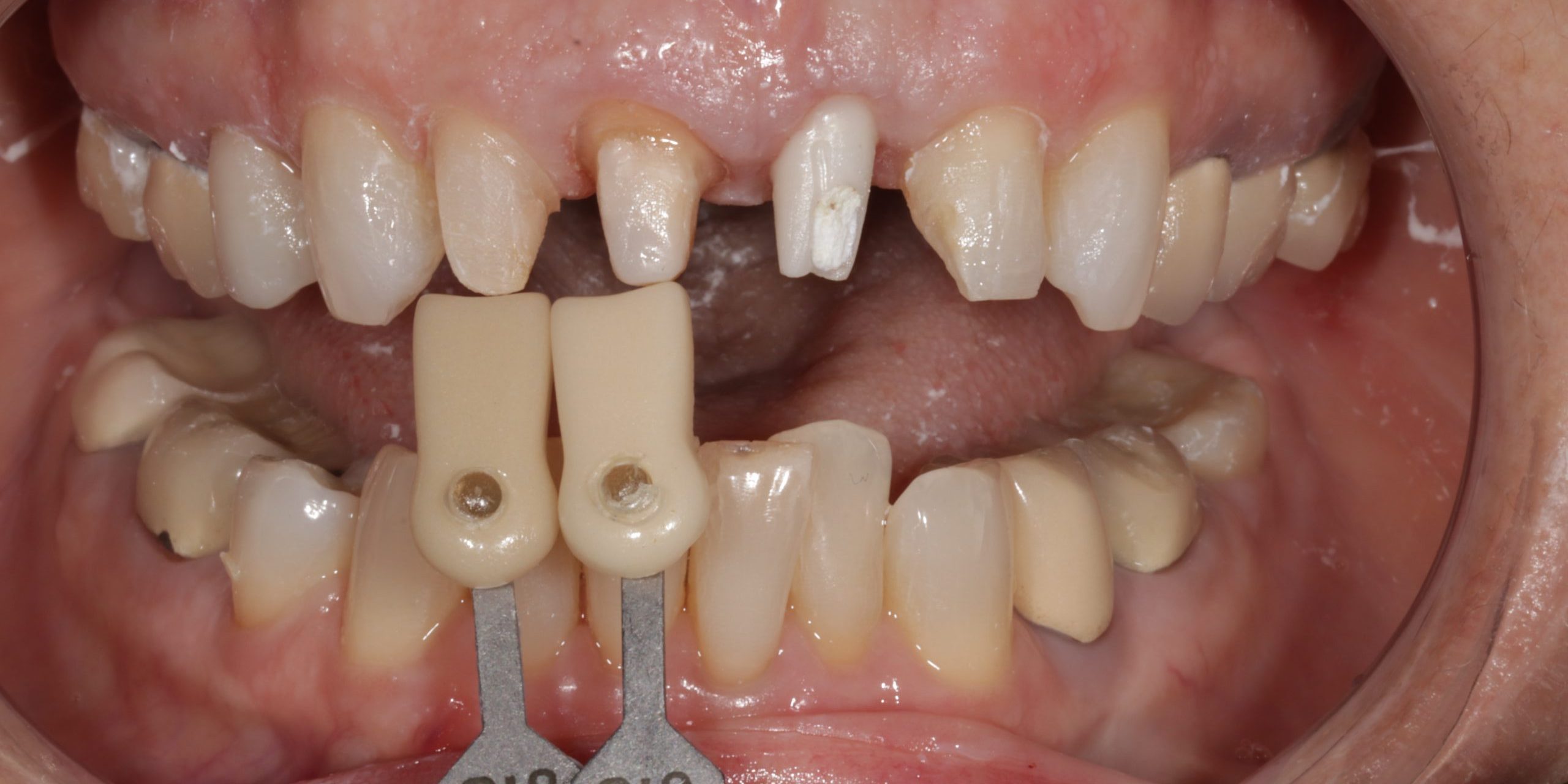
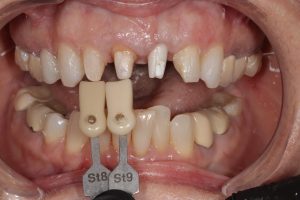
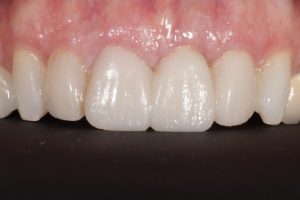
The patient returned for the removal of crowns on teeth #8 and #9 and the preparation of teeth #7 and #10 for veneers. Esthetic crown lengthening was performed on teeth #7 and #8 to harmonize gingival architecture. Stump shade photographs of the prepared teeth were captured, and all records were forwarded to the technician. The patient was then fitted with Luxatemp temporaries, crafted from a matrix derived from the 3D-printed design (Figs. 15-17).
-
- Figure 15
-
- Figure 16
-
- Figure 17
Appointment #3: Post-op/photo appointment
Adjustments were made to the temporary restorations until the patient was satisfied. An intraoral scan of the adjusted temps was taken. Additional photos were also captured, including those with reference glasses and a shade tab to match the existing dentition. All these records were then forwarded to the ceramist. We chose GC LiSi Press material for this treatment because of its esthetic qualities and minimal thickness, allowing for less tooth reduction.
Appointment #4: Insertion appointment
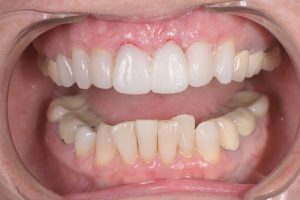
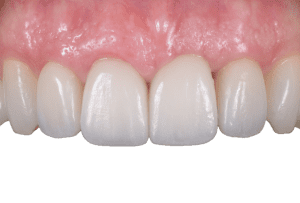
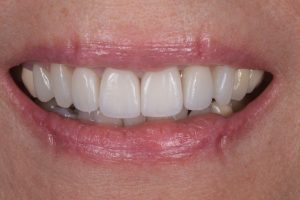
Temporary restorations were removed, and the final crowns and veneers were cemented (Figs. 18-20).
-
- Figure 18
-
- Figure 19
-

- Figure 20
Conclusion
With the iTero-exocad Connector, I was able to send scans, iTero NIRI and intraoral camera images, and patient photos directly to my exocad design station, streamlining my chairside workflow. It allowed me to design in real time while the patient was still in the chair, and it eliminated the time and inconvenience of manually located and downloading scan files from the website while separately retrieving photos from the memory card.
Sharing files with my ceramist was now easier since additional records, like images and patient PowerPoint templates, could be sent together with a scan. Consolidating all case-related data into a single secure channel simplified organization, communications and saved time The files were permanently stored within the patient’s iTero profile, providing easy access for future reference.
In this specific case study, having a preexisting scan of the patient’s dentition before her work with another dentist was crucial. It allowed us to visualize significant shape changes with the new restorations and was a blueprint to restore the tooth anatomy she had lost.
The iTero-exocad Connector is an integral tool for dental professionals who wish to fabricate their own digital deisngs in-house; it allows for quick digital wax-up design during a consultation appointment, negating the need for follow-up sessions. It offers a unified platform for organizing all files, photos and data pertinent to a case, enhancing efficiency and patient care. While I employ a direct chairside workflow using the iTero-exocad Connector, I also switch it to be seamlessly integrated into a conventional dentist-dental lab workflow.
About the Author
 Dr. Diana Tadros, AAACD, FICOI, FAGD is a renowned cosmetic dentist who leads her own practice, “Beauty and the Teeth,” located in Fort Lauderdale, Florida. In her practice, she places a strong emphasis on delivering patient-centered care and stands as the sole Board Accredited Cosmetic Dentist in Fort Lauderdale. In addition to her practice, she serves as an instructor at the Kois Center, where she specializes in courses on digital design. Dr. Tadros is committed to advancing the field by educating fellow dental professionals on digital dentistry and the practical application of exocad DentalCAD software.
The opinions expressed in this clinical report are those of the author and may not reflect those of Align Technology. The author was paid an honorarium by Align Technology in connection with this clinical report.
This article was originally published in the May 2024 Journal of Dental Technology